A field manual for FrontWars
The keys the client uses
The client prints its own key list on the Instructions screen, in eight tabs. This page is that list, reorganised by what you are trying to do, with the platform differences separated and one row that a portal page gets wrong.
- TESTEDevery binding below, in the Windows client, 2026-11-03
- IN-GAMEthe bindings are quoted from the client's Instructions screen
- OFFICIAL ONLYthe macOS glyphs come from a CrazyGames page, not from a Mac
- NEEDS CHECKa Mac capture of the same screen
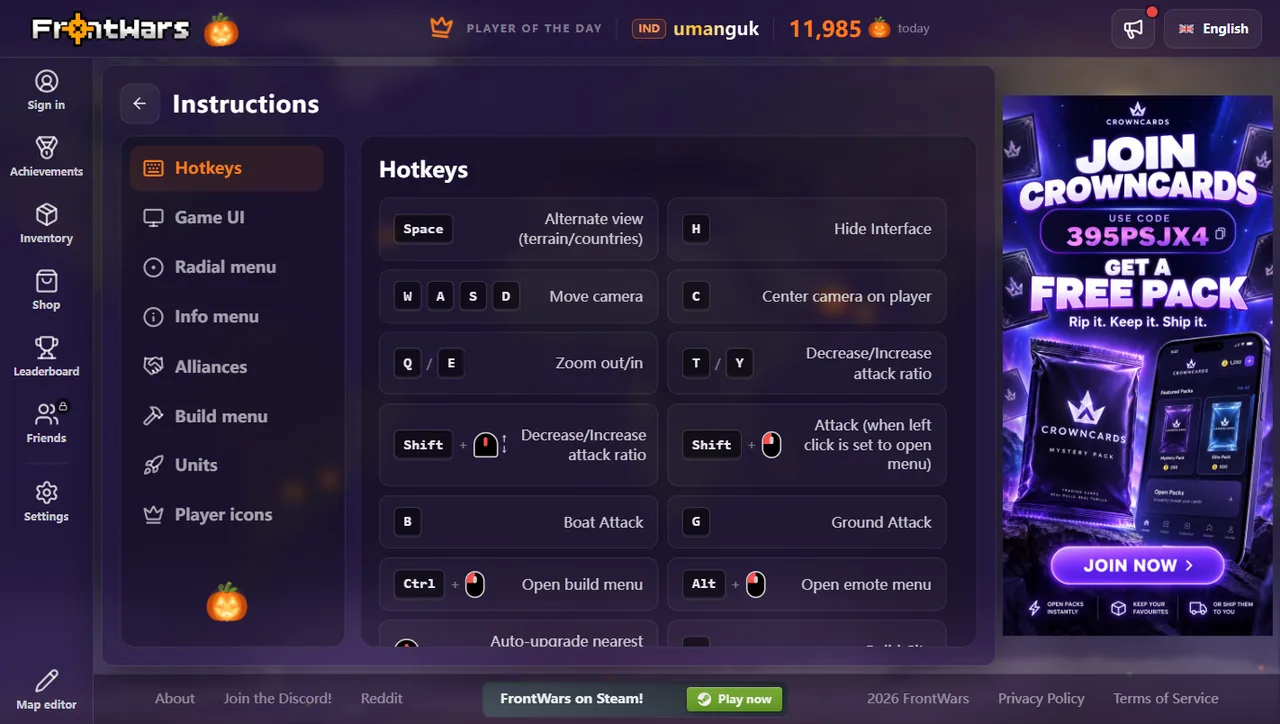
Camera and view
| Keys | Action |
|---|---|
| W A S D | Move camera |
| C | Center camera on player |
| Q / E | Zoom out / in |
| Space | Alternate view (terrain / countries) |
| H | Hide interface |
| Shift + D | Performance overlay, inside a match |
Building
| Key | Builds | Cost |
|---|---|---|
| 1 | City | 125,000 |
| 2 | Factory | 125,000 |
| 3 | Port | 125,000 |
| 4 | Defense Post | 50,000 |
| 5 | Missile Silo | 1,000,000 |
| 6 | SAM Launcher | 1,500,000 |
| 7 | Warship | 250,000 |
| 8 | Atom Bomb | 750,000 |
| 9 | Hydrogen Bomb | 5,000,000 |
| 0 | MIRV | 35,000,000 |
| Ctrl + left click | Open build menu | — |
| Middle click | Auto-upgrade nearest building | — |
Attacking
| Keys | Action |
|---|---|
| Left click | Attack, when left click is set to open the menu |
| Shift + left click | Attack (while left click opens the menu) |
| G | Ground attack |
| B | Boat attack |
| T / Y | Decrease / increase attack ratio by 10% |
| Shift + mouse wheel | Attack ratio |
| Alt + left click | Open emote menu |
Right click opens the radial menu: info at the top, boat attack to the right, alliance at the bottom, attack to the left. It is the same attack, reached without the keyboard.
The two platform differences
Windows binds the build menu to Ctrl and the emote menu to Alt. A localised CrazyGames page prints them as ⌘ and a backslash glyph instead — those are macOS symbols, and the page is describing the Mac build of the same game. Both can be true at once; what you should not do is follow the Mac column on Windows.
That same page lists 1 and 2 as attack-ratio keys. In the client they build a city and a factory, and the ratio keys are T and Y. We pressed them; the ratio moved ten points a press.
Changing and resetting
Settings has a Keybinds page with six sections — View options, Build controls, Attack ratio controls, Attack keybinds, Zoom, Camera — and a Reset all keybinds button at the top. Rebind the build slots if you use a non-QWERTY layout: the slots are number-row keys, not numpad keys.
The map editor has its own keys
The editor at /editor/ is a separate application with a different key list: B brush, G bucket, Shift + E erase to water, I picker, E elevation, S smooth or sharpen, L level, R gradient slope, O erosion, M marquee, W wand, N place nation, Space pan. Two of those collide with in-match keys (B, G), so close a match before you edit a map.
Last checked against the client: 2026-11-03 · client v42.5