A field manual for FrontWars
Your first thirty minutes
A match is a map, a gold loop and a border fight, in that order. This is the sequence for the first thirty minutes, and the three mistakes the tutorial prompt does not mention.
- TESTEDthe lobby, the spawn and the first purchases, 2026-11-03
- IN-GAMEthe retreat cost and the ratio cap, quoted from Instructions
- OFFICIAL ONLYCrazyGames lists the game; none of its figures are used here
- NEEDS CHECKwhere the replay button is after a match ends
Open a match
The client opens on a lobby with one column of pages down the left: Single Player, Create Lobby, Join Lobby, Community Maps, Tutorial, Instructions, and the map editor at the foot. A language menu sits in the top bar next to the sign-in button, and single player does not ask you to sign in. Instructions is the page the rest of this manual is built on; open it once before your first match.
Choose the map before the match, not during
Single Player shows six fields and one button:
| Field | Default | What it changes |
|---|---|---|
| Map | World | 31 entries; each has its own default nation count |
| Mode | Free for All | everyone against everyone |
| Difficulty | Balanced | bot aggression, per the client's label |
| Economy mode | Classic | Classic or Fast; no Chaos in this build |
| Bots | 400 | how many bots fill the map |
| Modifiers | — | empty in single player |
The map list beside the panel is the same picker a private lobby uses, and it carries the nation count: World is 61 by default, Black Sea is 9, Europe is 49. Single player has no Nations field — the map decides. If you want to change it you need a private lobby's Rules & Options, where the field reads 61 (Map default) and can be overridden.
The first twenty seconds
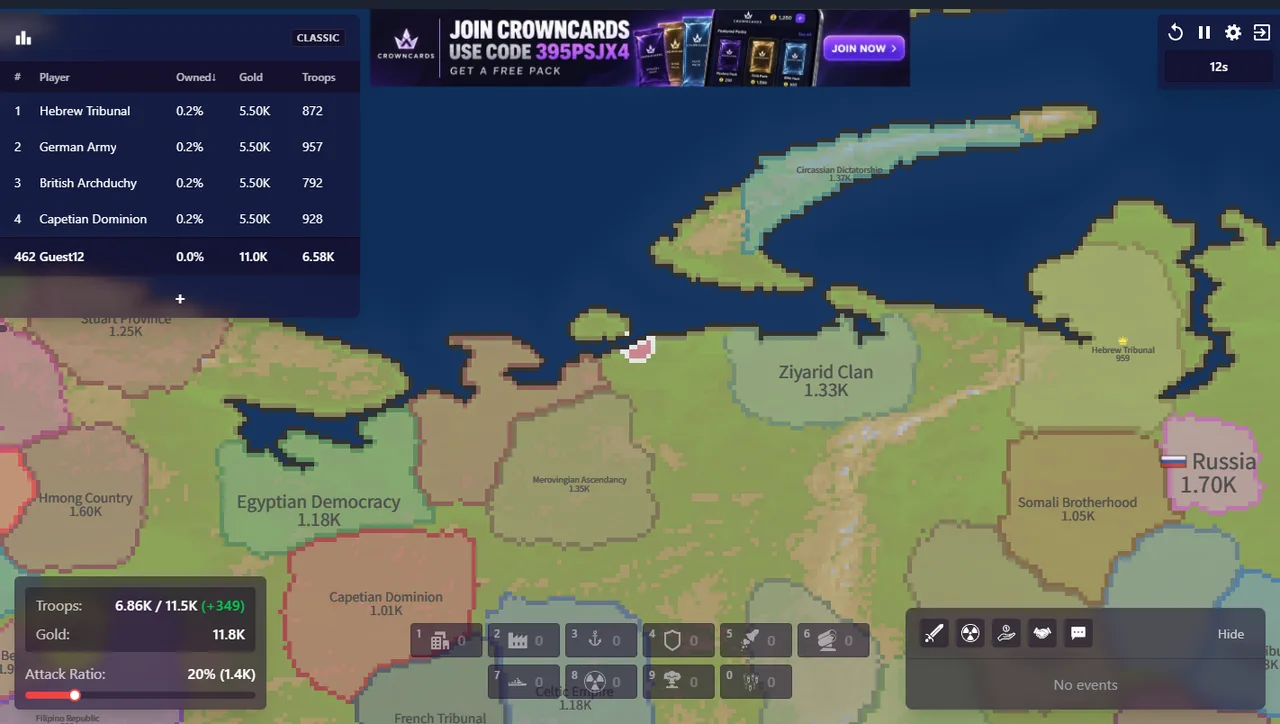
The map draws first and the HUD appears only after your spawn resolves. Three numbers then matter, all of them bottom-left:
- Troops: current against maximum, with the growth rate in brackets. On our spawn the panel read 11.2K / 12.1K (+85).
- Gold: the currency everything is bought with. Ours read 31.8K and climbed while the match ran.
- Attack Ratio: how much of your army an attack commits. It starts at 20% and the bracket converts it for you — 20% (2.3K).
What to buy first
Prices are on the build bar and in the build menu (Ctrl and left click). The cheapest thing that changes a fight is the defence post at 50,000; the city at 125,000 is the first purchase that raises your troop ceiling.
| Order | Building | Cost | Why first |
|---|---|---|---|
| 1 | Defense Post | 50,000 | cheapest way to make one border expensive to cross |
| 2 | City | 125,000 | raises the population ceiling, so troops keep growing |
| 3 | Factory | 125,000 | lays rails and spawns trains; the gold loop starts here |
| 4 | Port | 125,000 | only if you hold coast; trade ships pay both sides |
The three mistakes the tutorial does not mention
Attacking into a wall at 20%. The Instructions screen states that the ratio's effect does not go beyond a ratio of 2:1. Sending a fifth of your army across a border defended by a post spends troops to move the line an inch.
Retreating. A retreat costs 25% of the troops you attacked with, and a nuclear strike cannot be recalled at all. Press once to start an attack, and be sure before you press again.
Saving for a missile silo. At 1,000,000 gold it is eight cities, and you cannot fire it without a warhead that costs 750,000 more. It is a mid-match purchase, not a first one.
Next: Controls for the keys, then Economy for the loop these purchases feed.
Last checked against the client: 2026-11-03 · client v42.5