A field manual for FrontWars
Performance: the overlay is the only number
The client ships its own performance overlay, bound to Shift + D during a match. It prints frame rate, tick timings, draw calls and a memory breakdown — and it is the only performance number this site will ever publish.
- TESTEDthe overlay, opened in a live match and read 2026-11-03
- IN-GAMEevery label and figure below, quoted from the overlay
- OFFICIAL ONLYno store page publishes system requirements for the browser build
- NEEDS CHECKwhat any of it looks like on real hardware, on mobile, or on Fast economy
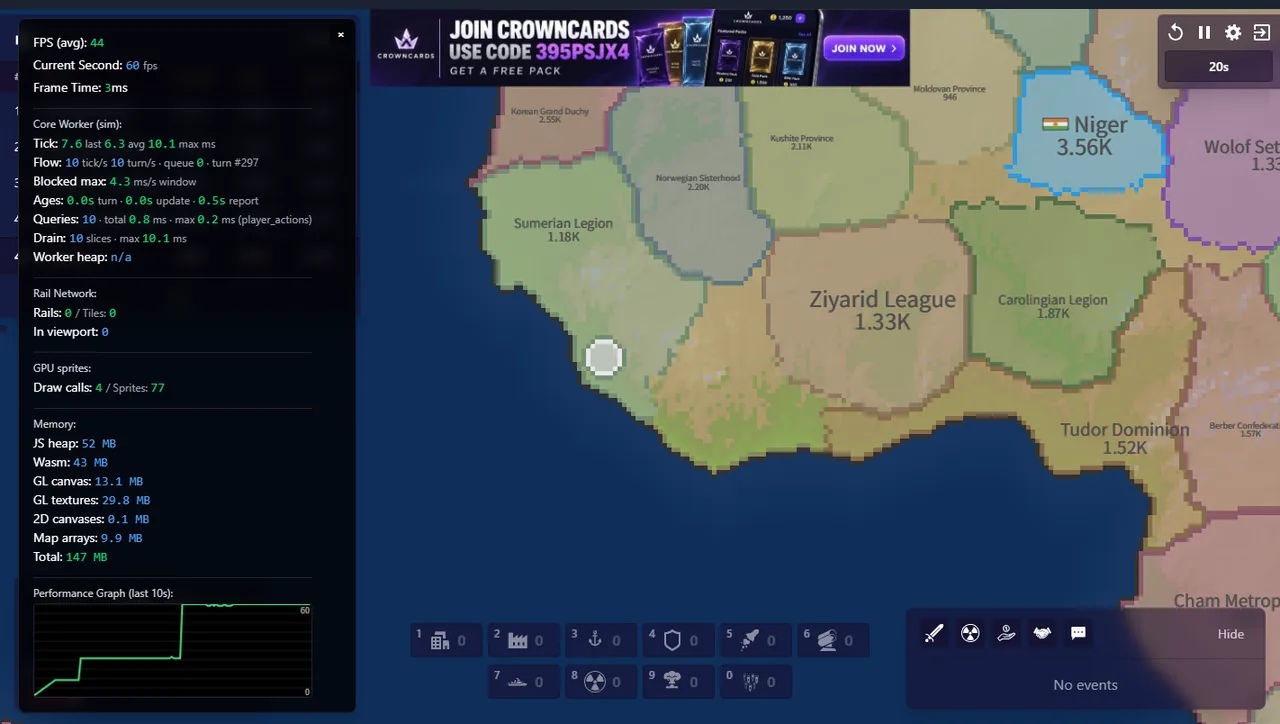
One reading, with its conditions
World, 400 bots, Classic, twenty seconds in, headless Chrome with software GL, 1422×804, on a machine also running a second browser and a capture script. Average frame rate 44, current-second rate 60, frame time 3 ms. Tick time 7.6 ms last, 6.3 ms average, 10.1 ms max. Flow 10 ticks per second, 10 turns per second, queue 0. Draw calls 4, sprites 77. Memory: 52 MB JavaScript heap, 43 MB WebAssembly, 13.1 MB GL canvas, 29.8 MB GL textures, 9.9 MB map arrays, 147 MB total.
What the numbers mean
Tick time is the one to watch. The client simulates a turn ten times a second; if a tick takes longer than 100 ms the match starts dropping turns, and nothing about a bigger map or more bots helps. 6.3 ms average is comfortable and 10.1 ms max is one slow turn in twenty seconds.
Draw calls at 4 is the surprise: this is not a game that redraws thousands of trees. Almost everything you see is batched into a handful of calls, which is why a browser can run a 400-bot war at all.
Why we will not turn this into a benchmark
Because software rendering in a headless browser is not the machine you play on, and because we changed nothing between the reading and the next one: two minutes later the same overlay, same match, showed 60 average and 1 ms frame time once the map had settled. A number that moves that much with the match is not a specification.
Use this page the way you would use a photograph: as a fixed date and a fixed condition, so that the next reading can be compared to it. That is the whole promise of the four marks, and performance is where it is easiest to break.
Last checked against the client: 2026-11-03 · client v42.5