A field manual for FrontWars
Border, terrain, timing
Territory in FrontWars is a percentage on a leaderboard and a line on a map. This page is about the line: how it moves, what stops it, and what a long border costs you.
- TESTEDthe Owned column, the border lines and the alternate view, 2026-11-03
- IN-GAMEground attack, boat attack and the 25% retreat cost, quoted
- OFFICIAL ONLYthe win condition (72% of the map) is CrazyGames' line, not ours
- NEEDS CHECKhow much land one attack takes, and how terrain changes it
Reading the map
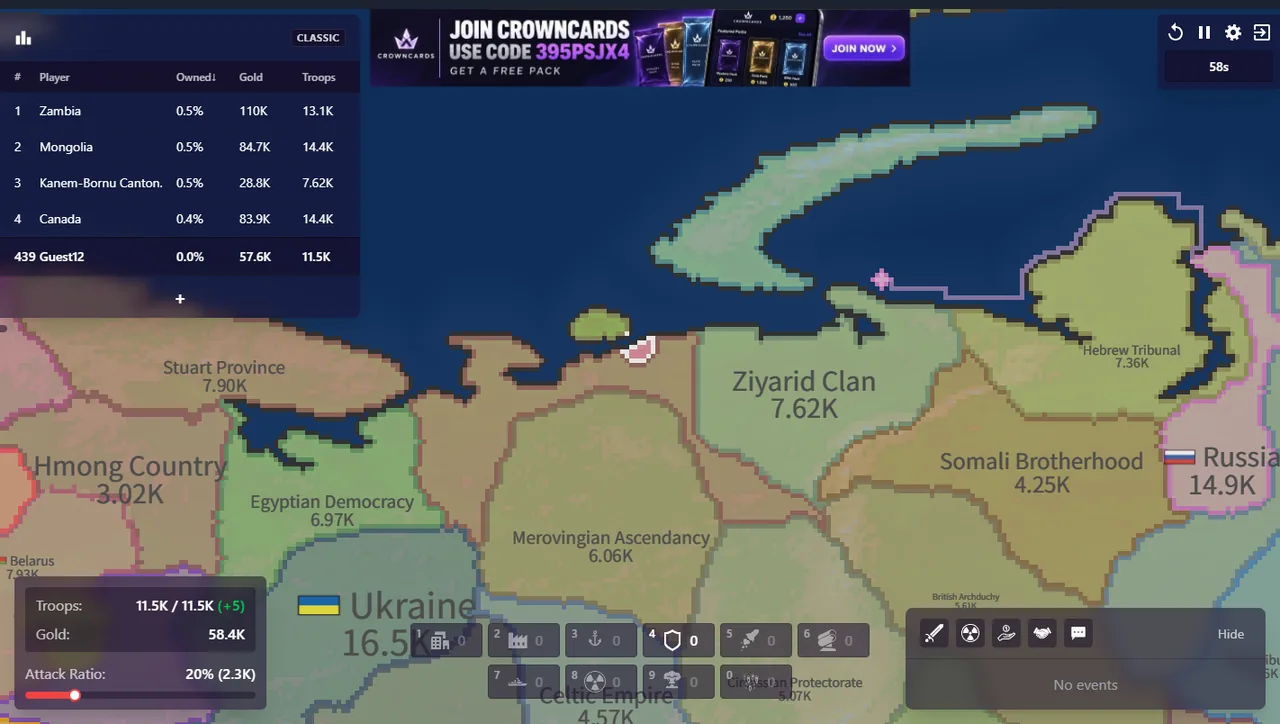
Every territory is filled with its owner's colour and outlined by a border line. The leaderboard at the left carries the number that matters most: Owned, as a percentage of the whole map, next to gold and troops. A player at 0.5% is a single country; the win condition printed on the store page is 72% of the map.
Space switches the map between terrain and country view. The terrain view is the one to open when you are deciding where to go: mountains and water are visible before you commit.
How the line moves
Land changes hands by attack. G is a ground attack across a border you share; B is a boat attack across water, and only a port lets ships exist at all. Both spend the troops the ratio bar commits, and both can be pulled back — at the cost of 25% of the attacking force.
What we can see, and what we cannot: we see the line move and the Owned percentage change. We have not measured how many tiles one attack takes at a given troop count, so this page does not print a conversion.
What a wide border costs
Every neighbour you share a line with can attack along that line. A single long border is one front; a corner touching three countries is three. The Instructions screen's defence post increases the defences of nearby borders, and the SAM has a range printed in the client as 100 pixels — both are about covering a stretch of line, not a point.
This is why our opening order avoids junctions: take one direction, hold it with a post, and only then widen.
The opening we use
- Find your spawn, press C to centre, read the Owned column to see how small you are.
- Look at the three nearest neighbours' troop counts — they are printed inside their territory — before touching the ratio bar.
- If a neighbour is weaker, take one bite at high ratio and stop at a natural edge (coast, mountain, another border).
- If it is stronger, buy the 50,000 defence post and grow instead: a city at 125,000 raises the ceiling, and the ceiling is what wins the next exchange.
Next: Attack ratio for the bar this page keeps mentioning, and Defense for where to put the post.
Last checked against the client: 2026-11-03 · client v42.5